Atlas.
Atlas is a mobile experience that allows users to browse and explore places without needing a specific destination in mind. This project focused on simplifying the early stage of travel planning by creating an interface that encourages exploration while avoiding the complexity common in many travel tools.
Over several months, I led end-to-end design across UX research, interaction design, visual design, and prototyping — developing a platform that turns exploration into a personalised, curiosity-driven journey.
Focus
Research-informed concept, mobile product design
Role
Product Designer
Duration
2 months
Tools
Figma
The Challenge
Most travel apps assume that users already know where they want to go. Search interfaces typically begin with a destination field or a map, which works well when travellers already have a place in mind. But in reality, many people begin planning a trip with only a vague idea like somewhere warm or somewhere scenic.
In this early stage, I discovered from feedback on early designs that multiple immediate layers of complexity including maps, filters, sorting options, price comparisons, and accommodation listings, can make the experience feel overwhelming before the user has even begun exploring. The challenge for Atlas was: How might we create a travel discovery experience that feels effortless and inspiring rather than overwhelming?
Understanding the Space
To validate the need, I reviewed current travel-discovery behaviour and market gaps. Recent studies (e.g., Expedia 2024 Travel Trends Report and Skyscanner Insights) show:
71 % of travellers want recommendations that reflect personal interests.
58 % feel overwhelmed by the number of travel options online.
65 % are motivated by discovering lesser-known locations.
These data points reinforced the opportunity for a platform centred on interest-based exploration rather than algorithmic popularity.
Defining the Experience
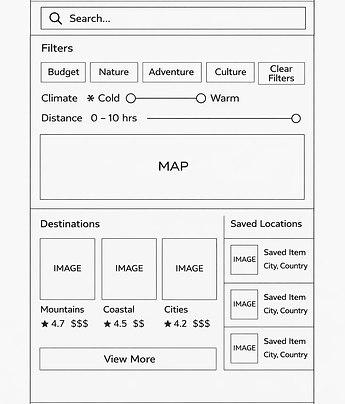
The first design direction attempted to combine several discovery tools into a single interface. The idea was to provide users with as many ways to explore on one page as possible so they could find destinations based on interests more efficiently with less screens.
While this approach offered flexibility, the feedback was that this was too visually dense. Users would need to process multiple interaction types at once before they could simply browse destinations. This early version revealed an important insight: Discovery should feel lightweight. Users should be able to start exploring immediately, without needing to learn how the interface works first.
Redesigning the Experience
Based on this insight, I redesigned the structure of the app to separate different types of tasks. Instead of showing everything at once, the experience was divided into three focused areas:
A simple feed where users can browse destinations and discover new places.
A space where users can adjust travel interests such as climate, travel style, and budget.
A place to store destinations users want to revisit later.
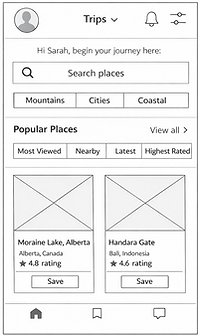
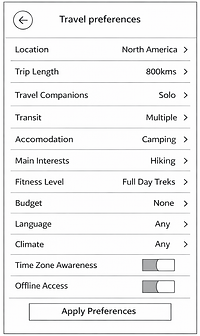
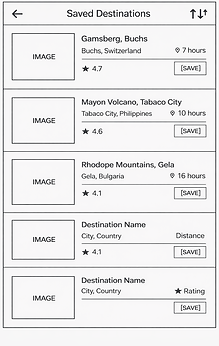
Separating these functions reduced the amount of information users had to process at once and allowed the discovery experience to remain simple.
Final Product Experience
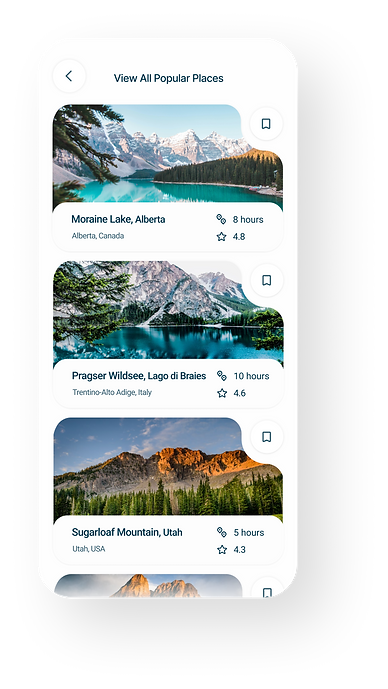
The final design centres around a simple discovery feed where users can browse destinations through visual destination cards. Each card highlights the character of a location and provides enough information for users to quickly decide whether they are interested. Users can: browse destinations, learn what makes a place unique, and view additional destinations within that field. When users want to refine their results, they can adjust their travel preferences in the dedicated preferences section.
This structure balances two important goals:
Inspiration
Users can casually browse destinations without committing to a search.
.png)
Control
Users can refine results when they want more personalised recommendations.
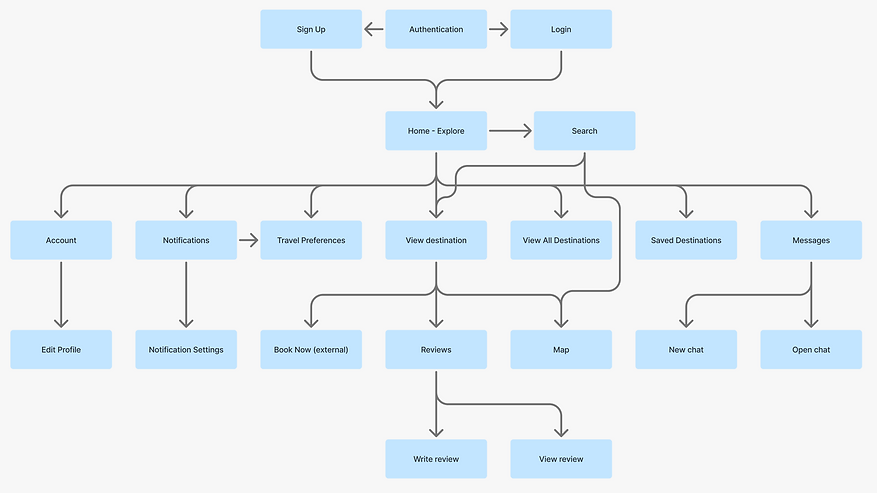
Information Architecture
Final Product Experience
The app was organised around user intent instead of features:
Explore — browse and discover destinations
Preferences — refine travel interests when needed
Saved / Account — manage personal activity
This allowed the experience to prioritise discovery first, with other actions available as secondary steps and created a clearer and more predictable flow: browse → view → refine (optional) → save
Design
Visual Language
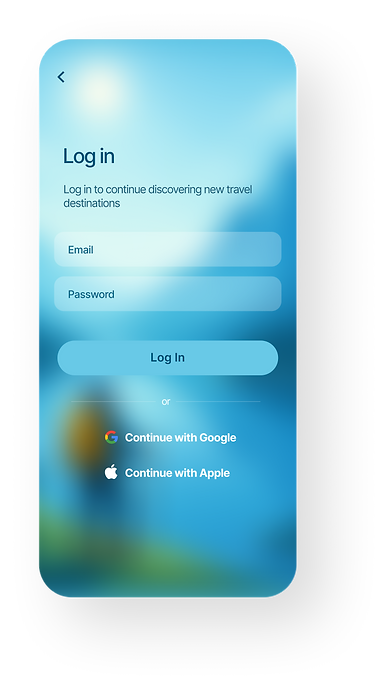
The visual language of Atlas is designed to make exploration feel immersive and visually led, rather than interface-driven. Across the product, large destination imagery is prioritised over UI elements, allowing places to communicate their atmosphere before users engage with details. This is especially evident in the onboarding and explore screens, where full-bleed visuals and soft gradients create a sense of depth and openness, reinforcing the idea of travel as an experience rather than a task.
The interface itself is intentionally restrained. Components such as cards, navigation, and inputs use soft edges, subtle shadows, and consistent spacing to remain present without competing with content. Information is layered progressively — for example, destination cards surface only key details (location, rating, time) while deeper information is revealed within the destination view. This reduces visual noise and allows users to move quickly through options without feeling overloaded.
Colour and contrast are used to guide attention rather than decorate the interface. Primary actions are clearly defined, while secondary elements remain subdued. The palette draws from natural tones found in travel environments, helping maintain visual consistency between UI and content. Typography is kept simple and readable, supporting quick scanning across lists, preferences, and detailed views.
Overall, the visual system is designed to feel lightweight, consistent, and content-first, supporting the core goal of Atlas: making destination discovery intuitive, engaging, and easy to navigate.
%20Screen.png)




Prototype & Interaction
Interactive prototypes were developed in Figma to simulate end-to-end journeys: Smooth onboarding transitions and authentication flow. Scroll-based destination reveal animations. Lightweight modal transitions for reviews and settings. This approach allowed rapid validation of flow clarity and motion rhythm.
Testing & Validation
A small round of concept validation was performed through informal user walkthroughs and secondary research synthesis.
Key learnings included:
Users valued visual immersion (large imagery and gradients increased engagement).
Preference-driven filters were more meaningful than generic search.
Clear signposting (“Explore,” “Saved,” “Map”) improved confidence and reduced drop-offs.
These findings guided micro-interaction refinements and content hierarchy adjustments.
Outcome
Atlas successfully demonstrates how personalisation and simplicity can reshape digital travel discovery.
Streamlined flow reduced average task steps from 6 → 3 compared to typical itinerary apps.
Early testers described the interface as “calm, effortless, and visually immersive.”